Official updates

YourFans Subscriptions are LIVE! - plus custom GIF packs, a new perk for your members

YV - Gino
YV - Gino
Admin
(edited)
#1

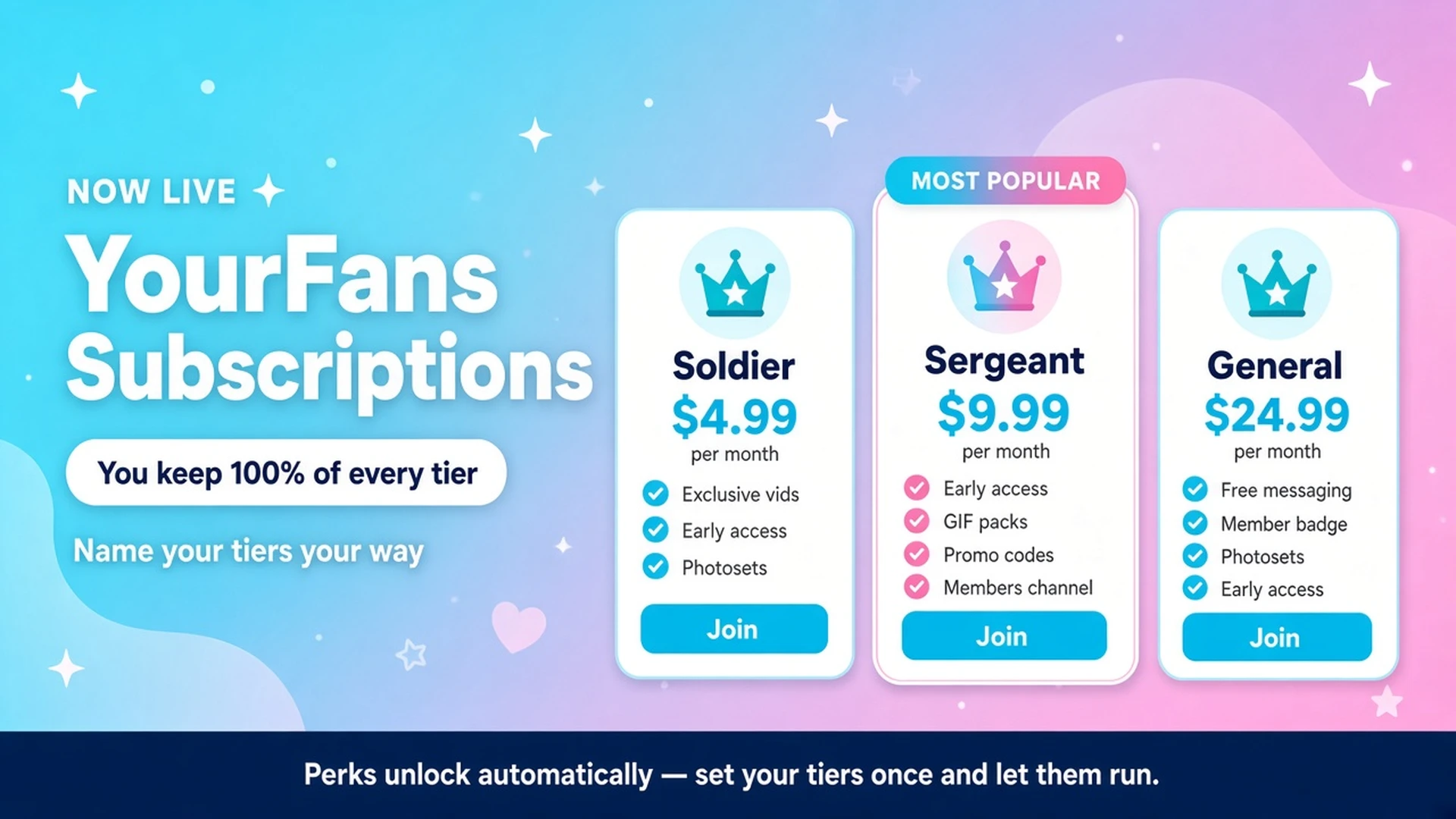
YourFans Subscriptions are here! Fans can now support you with a monthly membership, and you keep 100% of the tier price,  fees are added on top at checkout, same as videos and tips.

For creators
Open Headquarters → Subscriptions, add up to 3 tiers ($4.99–$500/month, each with its own name and perks), then switch on Live on your profile. Nothing shows to fans until you do.

Built-in perks you can turn on per tier: members-only videos, free videos, included photosets, members-only wall posts, free messaging, a private members channel, member-only promo codes, a member badge, and now custom GIF packs.

For fans
Look for the YourFans strip on a creator’s profile, or tap a locked video or members-only post. Join with a saved or new card, cancel anytime from Account → Subscriptions (you keep access until the end of your paid period).

Full details, fees and examples: YourFans FAQ → https://yourvids.com/help#yourfans

Custom GIF packs: your reactions, your GIFs.
Creators can now build GIF packs that members unlock through a YourFans tier and use in Messenger, chat rooms, wall posts and Community.

Creators: Headquarters → Settings → GIF Packs. Create a pack, upload your GIFs, Submit for approval, then Publish once approved. In Subscriptions, edit a tier, enable Custom GIF packs and select the pack. Do this for each tier that should include it.

Members: join a tier that includes the pack, open the GIF picker and switch from Giphy to Custom.

Upload limits and step-by-step help: Custom GIF packs FAQ → https://yourvids.com/help#custom-gifs

Try both out and tell us how it feels.

Gino
18 6

6 Replies

Destiny Diaz
57
Destiny Diaz
YV Team Creator
#2
custom gif packs have arrived... loveee all the perks that I can offer to fans that are so automated, I also love the private chat channel!
GIF
9
Dulce
30
Dulce
#3
What a great improvement! Now I'll be able to offer so much more content! ty so much!
4
PaintedRose
36
PaintedRose
#4
Heck YES and I have my first SUBSCRIBER! I am going to make my fans delight daily in my deliciousness. I love all the new add on services! Thank you YourVids!  Rosieee
7
SilkyRyu
80
SilkyRyu
#5
i’m still building my tiers but OMG??! a GIF pack feature??

i gotta get on this…
4
YV - Gino
YV - Gino
Admin
(edited)
#6

Update: show fans what's already inside your channel 📸

Anyone who joins a tier with your private members channel gets your whole channel history, not just what you post after they join. Once your channel has at least 5 free photos and videos, your plans popup, checkout and profile strip now show fans how much is waiting (e.g. "23 photos · 7 videos already inside"). Below 5 it stays hidden. Pay-to-open files don't count.

Headquarters → Subscriptions → Members channel now shows your progress toward 5 and a live preview of exactly what fans will see.

Also post to my wall: when you post in your members channel, tick Also post to my wall. Your followers see a locked teaser in their feed that opens your plans in one tap, and members get a link straight into the channel. Nothing from the message is shown to non-members. It works for scheduled channel posts too.

Photos & videos filter: in any Messenger conversation, including channels, tap the images icon at the top of the chat to see only messages with photos or videos. Scroll up to load older media, and tap Show all messages to go back.

Fans: your subscriptions now have their own spot in the profile menu (look for NEW).

Details: https://yourvids.com/help#yourfans-channel 💜

3
YV - Gino
YV - Gino
Admin
(edited)
#7

Update: your members can now post in your channel

Until now, only you could post in your YourFans members channel. You can now let your members post text and GIFs to the whole group, on the tiers you choose.

1. Go to Headquarters → Subscriptions → Members channel.

2. Under Who can post, tick the tiers you want (or All tiers), then click Save who can post. Nothing changes until you do. Your channel stays creator-only by default.

3. Members can send text and GIFs only. No files, voice notes or scheduled posts.

4. You can delete any message in your channel.

5. If someone abuses it, tap the block button on their message (long-press on mobile). They can keep reading but can't post. Unblock them anytime from the same Members channel card.

1

Official updates

Only admins can post or reply in this category.