How can we help you?
Find answers to common questions or get in touch with our support team
Frequently Asked Questions
Quick answers to common questions
A small fee is added at checkout to cover secure payment processing, cloud storage, lifetime streaming access, and platform maintenance. Creators always keep 100% of their listed price.
| Purchase type | Service fee |
|---|---|
|
Video
|
$1.50 priced $8 or under / $2.50 over $8 |
|
Boutique
Deliverables (photos, audio, sexting, etc.)
|
$1.50 priced $8 or under / $2.50 over $8 Photos, Dick Rating, Audio, Sexting, Video Call, Messaging Access, Digital Goods Physical items: the $8 tier uses item price + shipping |
|
Boutique
Non-deliverables, GFE & custom videos
|
10% of item price Spoil Me, Other, GFE, Custom Video |
|
Custom video
|
10% of order price |
|
Tips
|
10% of tip amount |
|
Messaging
|
10% of message price Video attachments have a flat $1.50 service fee instead |
|
Contest votes
|
10% of vote price |
Creating an account is easy! Click the "Join Free" button in the top right corner of the page. You'll need to provide a valid email address, create a username, and set a secure password. You must be 18 years or older to register. Once registered, you can start exploring content and interacting with creators.
When signing up, simply select "Creator" as your account type. Once registered, you'll have access to your Creator Headquarters where you can upload videos, manage your boutique, and track your earnings.
We accept all major credit and debit cards (Visa, Mastercard, American Express, Discover), as well as select digital payment methods. All transactions are processed securely and your payment information is never stored on our servers. For privacy, charges will appear discreetly on your statement.
All purchases are billed discreetly. The charge on your credit or debit card statement will show as YVBILLING.COM — no other details about your purchase will be visible.
YV Digital Services
485 Brickell Ave Unit 3503
Miami, Florida 33131, USA
Due to the digital nature of our content, refunds are evaluated on a case-by-case basis. If you experience technical issues preventing you from accessing purchased content, please contact our support team within 48 hours of purchase. We'll work with you to resolve the issue or provide a refund if the problem cannot be fixed.
Many creators offer custom video services! Visit the creator's profile page and look for the "Request Custom" button. You can describe what you'd like and the creator will provide a quote. Once you agree and pay, the creator will produce your personalized content. Turnaround times vary by creator.
Yes! The Boutique supports both digital items (photos, audio, sexting, video calls, and more) and physical items that creators pack and ship directly to you — things like worn clothing, bras, stockings, costumes, jewelry, toys, prints, fan signs, and other merchandise.
Due to payment processor hygiene regulations, a small number of physical items cannot be sold: panties and other underwear bottoms, bra & panty sets, and bikinis/swimwear. These restrictions come from our payment providers and apply to every creator, with no exceptions.
Attempting to circumvent these restrictions — for example by listing a prohibited item under a different category — is a serious violation and can result in a ban from the site.
Absolutely. We take your privacy very seriously. All data is encrypted using industry-standard SSL/TLS encryption. We never sell your personal information to third parties. Payment processing is handled by trusted, PCI-compliant payment providers. You can review our complete privacy practices in our Privacy Policy.
Creators receive payouts on a regular schedule (weekly or bi-weekly, depending on their preference). Payments can be made via direct deposit, wire transfer, or other supported methods. Creators can track their earnings in real-time through their Creator Headquarters dashboard. There's a minimum payout threshold that must be met before funds are transferred.
A co-creator release form (also called a co-performer release) is required for every video or piece of content where another person appears. This applies even if the other person is only briefly visible or partially shown. The release form confirms that all individuals featured in the content have given their consent and verifies their identity.
- Any video where another person is featured or visible
- Content with multiple performers or collaborators
- Not needed for solo content where you are the only person appearing
Co-Performer Release Form
Here is an example release form you can use with your co-performers
Creator badges are a tiered recognition system based on community activity. The colored diamonds next to the CREATOR badge show a creator's level. The more diamonds and the higher the color tier, the more established the creator is in the community.
| Level | Diamonds |
|---|---|
| Creator | None |
| Pro I / II / III | / / |
| Boss I / II / III | / / |
| Elite I / II / III | / / |
| G.O.A.T. I / II / III | / / |
You can request account deletion by contacting our support team at support@yourvids.com. Please include your registered email address and username in your request. We'll process your request within 30 days. Note that some information may be retained as required by law or for legitimate business purposes as outlined in our Privacy Policy.
YourVids has two separate ranking systems for creators. Each one measures different things over different time periods.
Contest Ranking
- Ranked by total sales (in dollars) during the contest period
- Sales that count: videos, boutique items, bundles, and custom orders
- Tips, contest votes, messages, and UrTokens purchases do not count
- Weekly contests reset every week; monthly contests reset every month
- Top-ranked creators win cash prizes
- Ties are broken by whoever reached the score first
Site Ranking
- Based on a rolling 30-day performance window
- Weighted score: 70% earnings + 30% video views
- Recalculated automatically every day
- Only fully verified creators are eligible
- Shown on your profile — helps fans discover top creators
Your10 lets fans showcase up to 10 favorite creators on their profile. It's a way to show support and connect with the creators you love most.
How it works
- Each creator sets a minimum monthly spend required to be added to a fan's Your10
- Spend is calculated from all your purchases on that creator: videos, boutique items, bundles, custom orders, and tips
- Once you meet the minimum, click the Your10 button on their profile to add them
- Spending resets on the 1st of every month, and all Your10 selections reset too
- You can pick up to 10 creators and they appear in random order on your profile
Built-in perks for you
On top of any custom perks a creator offers, your Your10 picks unlock these benefits everywhere on YourVids:
- Your Your10 creators are prioritized in your post feed, so you see their new content first
- You get a dedicated Your10 filter and a special icon in your messenger to find their DMs instantly
- You receive important notifications about your Your10 creators, so you never miss a launch or update
Visibility
- Your Your10 is shown as a dedicated tab on your public profile
- You can hide or show your Your10 anytime from Account Settings → Privacy
- Creators can see which fans have added them and may offer special perks to their top supporters
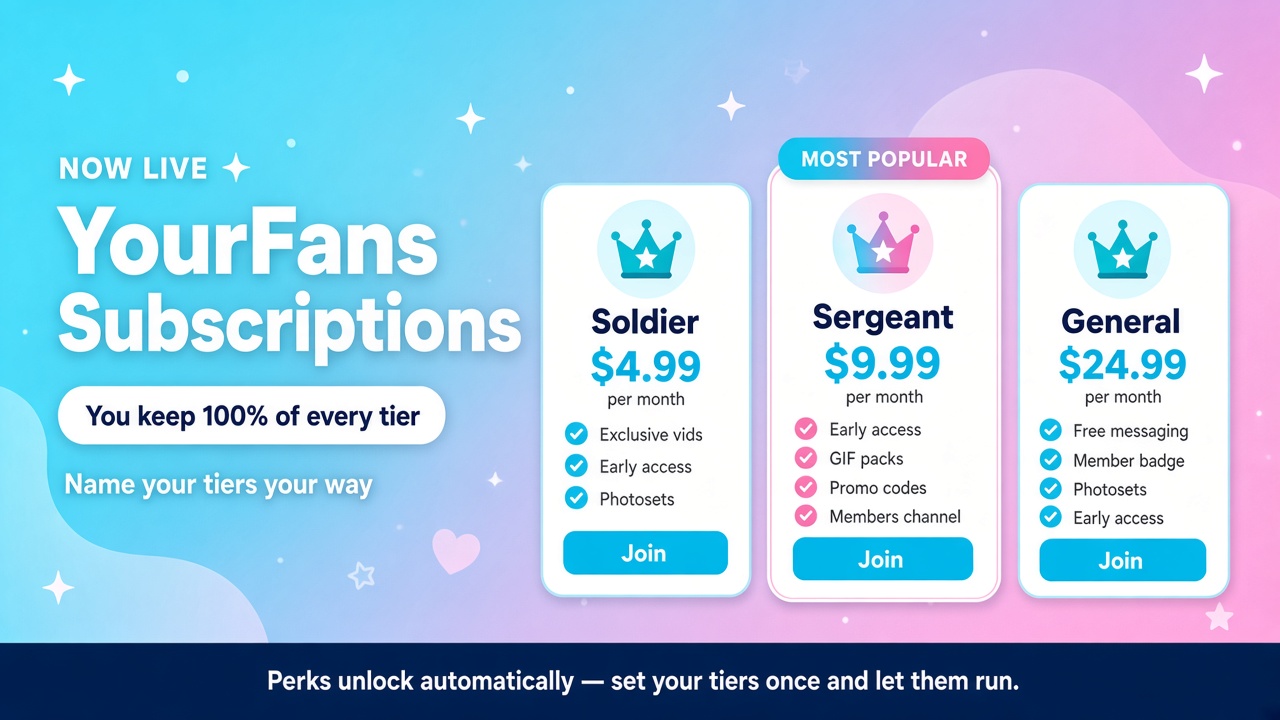
YourFans is a monthly subscription a fan pays to support a creator and unlock extra perks. The creator keeps 100% of the tier price. Fees are added on top at checkout, the same way they work on videos and tips.
Creators can offer up to 3 tiers (for example Soldier, Sergeant, General), each with its own price and perks. Nothing shows on a profile until the creator adds at least one tier and turns YourFans on.
Available to all creators. Open Headquarters → Subscriptions to create your tiers and choose your perks, then turn on Live on your profile when you are ready. Fans can join any creator who has gone live.
For fans
- Look for the YourFans strip on a creator's profile, or tap a locked video / members-only post to open the plans.
- Join with a saved card or a new card (3-D Secure). Billing is monthly until you cancel.
- Manage, cancel, or resume from Account → Subscriptions. Canceling keeps access until the end of the period you already paid for.
- Use View included videos on your subscription to open the creator's Vids with Included in my tier selected. These videos stream without another purchase. Anyone can use YourFans videos on a creator's profile to browse membership content; some videos may require a separate purchase.
For creators (Headquarters)
- Open Headquarters → Subscriptions. Set a headline, member name (default “Superfan”), intro, and whether to show member count.
- Add 1–3 tiers. Price each from $4.99 to $500.00 per month. Mark one as Popular if you want.
- Switch on the built-in perks you want for that tier, then add optional custom perk lines (display only).
- Flip the Live on your profile toggle. Until that is on (and you have at least one tier), fans see nothing.
Money, fees, and payouts
- You earn 100% of the tier price every month. A $9.99 tier pays you $9.99.
- The fan pays the price + a 10% service fee + 6% processing on the combined amount. Example: $9.99 + $1.00 service + $0.66 processing = $11.65 charged to the fan.
- VIP fee savings exclude YourFans subscriptions. The 10% YourFans service fee applies to the first payment and every renewal, regardless of VIP status. Joining or cancelling VIP does not change that fee.
- YourFans pay out like every other sale — they show in Headquarters Earnings and go out on the normal weekly payout cycle after the hold period.
- Price changes are grandfathered. Editing a tier's price never changes what current members already pay. Only new joins (and future upgrades, when those ship) use the new price.
Tiers, ranks, and branding
- Ranks follow price (lowest price = rank 1). You can lock a video, post, or promo code to “this rank or higher.”
- Perks are not inherited. Tick exactly what each tier includes. A higher tier only gets a perk if you switch it on there too.
- The member label (e.g. Superfan, Soldier, CareBear) is what fans see on buttons and lock copy. Badges use each tier's name. Leave the member label blank to use “Superfan.”
- Archiving a tier keeps it for existing members but hides it from new joins. A tier with no members can be deleted.
- Switching an existing member to a different tier is coming later. For now they stay on the plan they joined.
Built-in perks (platform-enforced)
These are real unlocks, not just marketing copy. Switch a perk on for a tier, then set it up where the hint says.
- Exclusive videos & early launches. Edit video → Members: Everyone, members-only, or members-first for a set number of days. Guests see a lock; adding to cart is blocked. Early access becomes public automatically when the window ends. Free videos cannot be members-only.
- Free-to-stream videos. Pick up to 5 of your active paid videos per tier. Members can find them through Account → Subscriptions → View included videos and watch them in full. Downloads are sold separately. The YourFans videos filter also lets visitors browse membership content before joining.
- Member discount codes. Link a promo code to a tier in Headquarters → Promo Codes. Choose Selected tier and above or Selected tier only. Selecting one tier only excludes every other tier, including higher tiers. The member's tier must also include the Discount codes perk. Members see their usable codes in the membership modal. Non-members cannot use a members-only code.
- Included photosets. Pick up to 5 active digital boutique photosets with auto-delivery files per tier. Members download the selected packs without buying them separately, from Subscriptions or the pack's page. Access lasts through their paid membership period; files already downloaded remain theirs. Select the packs separately for each tier that should include them.
- Custom GIF packs. Eligible, verified creators can include approved, published GIF packs in selected tiers. Members unlock those GIFs to use across supported areas of YourVids. See the Custom GIF packs FAQ for setup, access, and where to use them.
- Members-only posts. When you post on your wall (or the home composer), choose Everyone or members-only (and optionally a minimum tier). Non-members see a teaser, not the body or media. Those posts stay off Discover, trending, and search — they still appear locked on your wall and in For You for followers as an upsell.
- Free messaging. If you charge for DMs, members of a tier with this perk message you for free.
- Private members channel. A broadcast conversation in Messenger (you post, members read). Headquarters → Subscriptions → Create channel. To customize its name, enter an optional Messenger channel name under Branding and click Save branding. Leave it blank to keep the automatic name using your creator name and member label. Access requires an active paid period and a tier with this perk. You can offer pay-to-open files in the channel: each member buys their own unlock separately, and only you see how many people purchased each file. Joining the channel does not include those purchases. Members are added and removed automatically as their subscription status changes.
- Member badge. The member's tier name shows as a gold crown chip next to their name on comments, wall posts, and Messenger.
You can also add up to 8 custom perk lines per tier (short free-text bullets). Those are shown to fans but are not enforced by the platform — keep promises you can keep.
Growing your members channel
- “Already inside” counter. New members get your whole channel history, not just what you post after they join. Once your channel holds at least 5 photos and videos, the plans popup, checkout, and your profile strip show how many are waiting (e.g. “23 photos · 7 videos already inside”). Below 5, the counter stays hidden. Only free channel media counts — pay-to-open files are never promised as included. Only tiers with the Private members channel perk show it.
- Also post to my wall. When you post in your channel, tick Also post to my wall above the message box. Followers see a locked teaser on your wall and in their feed, and one tap opens your plans. Members whose tier includes the channel get a link straight into it. Nothing from the message is shown to non-members. Works for scheduled channel posts too: the teaser appears when the message goes out.
- Photos & videos filter. In any Messenger conversation, including channels, tap the icon at the top of the chat to show only messages with photos or videos. Scroll up to keep loading older media; tap Show all messages to go back. Pay-to-open files you haven't bought still show locked.
Billing, canceling, and failed cards
- Joining charges immediately and starts a monthly rebill on the same card.
- Cancel anytime. Access continues until the end of the paid period. You can resume before that date if you change your mind.
- If a renewal card is declined, the membership goes Past due and both of you get a notification. Update the card to restore it.
- If a creator's account is deleted or suspended, their members' subscriptions are canceled so nobody keeps getting billed.
- You cannot join your own YourFans. Blocked users (either direction) cannot join.
Custom GIF packs are collections of a creator's reactions that fans can unlock through selected YourFans tiers and use on YourVids.
Available to creators. All eligible, verified creators with active accounts can create and manage packs. Fans unlock approved, published packs through a YourFans tier that includes them.
Where do creators upload and organize GIFs?
Open Headquarters → Settings → GIF Packs, choose New pack, add a name and optional description, then Create pack. Drop several GIFs into the uploader or use Choose GIFs.
Name, tag, and arrange your GIFs, then choose Save all changes; the first GIF is the pack cover. Your creator name is automatically added before each GIF name so fans can find your reactions.
What files can I upload?
GIF files only, up to 640px wide and 640px high, 5 MB per file, 5 seconds, and 100 frames. Upload only content you have permission to use. Each file must meet all of these limits.
When can my pack be used?
After uploading and organizing your pack, choose Submit for approval. This starts processing and safety checks, followed by a team review of every GIF and the pack. Uploading alone does not make it available. Once approved, choose Publish approved pack. Pack changes require a new review before the updated version can be published.
How do I include a pack in a paid tier?
After publishing, choose Choose YourFans tiers or open Headquarters → Subscriptions. Edit a tier, enable the Custom GIF packs built-in perk, select the packs to include, and save the tier. If you are setting up YourFans for the first time, turn on Live on your profile when your tiers are ready.
Need to make a pack first? Use Create or manage GIF packs beside the tier's GIF perk. Settings opens in a new tab, so your unsaved tier changes stay in place. After approval and publication, save any tier edits, refresh Subscriptions, then reopen the tier editor to select the new pack.
Select packs separately for every tier that should include them. A higher-priced tier does not automatically inherit another tier's packs. GIF packs are currently included as a YourFans membership perk; they cannot be sold separately or listed for sale in Boutique.
How do fans unlock and find their GIFs?
Join a creator's YourFans tier that includes the pack. Open the GIF picker and switch from Giphy to Custom to see your unlocked GIFs. Filter by pack or search by creator name, GIF name, or tags, then select a GIF to add it to your message or post. Creators can also use their own approved, published packs without joining their own membership.
Where can Custom GIFs be used?
Use them in Messenger, chat rooms, wall posts, and community discussions and replies wherever the GIF picker is available and you can post. Creators can also send them in their YourFans channel; members read that channel. GIF access does not change who can send messages or post in a particular area.
What happens if my membership ends or a pack disappears?
You can use included packs during your eligible paid membership period. Canceling keeps access until that period ends; an expired or past-due membership cannot send new GIFs from those packs. Packs can also become unavailable if the creator removes them from your tier, retires them, or loses access, or if they are removed through moderation.
GIFs already sent normally remain visible to people who can view the message or post, even after membership access ends. Moderation can remove them. Seeing someone else's GIF does not unlock the pack for your own use.
Still have questions?
Our support team is here to help. Reach out and we'll get back to you as soon as possible.
Email Support